Cisco: How to determine the serial number of hardware components

cisco-serial-numbersSome days ago I had to check for the serial number of a faulty fan tray that need to be exchanged in C6500 series. Now most of you I believe know the commands “show version” or “show hardware” which will get all the information that you need most of the time, but not always. I decided to put in this post some useful commands to identify the Cisco hardware components and their respective identifiers (serial nnumber) on different platforms.

I will use for my example a C6500 series switch, because this support most of the commands that I know. Also the real serial numbers will be stripped out and replace with a fake one, as I don’t want this to be used by third parties.

show version – Any network administrators who work with Cisco devices are more than likely familiar with the show version command. The most common use of this command is to determine which version of the Cisco IOS a device is running, but this command also offers different usesful information like the IOS version, ROM bootstrap, uptime,  RAM quantity, FLASH capacity and many more. Coming back to our topic from this post, show version ouput the Processor board ID which should be the same serial number like the one printed on a sticker on the back of the Cisco device. This is also used as the device serial number in any service contract that you might have. You can see below an excerpt of the show version command on C6500 platform:

Cisco Internetwork Operating System Software
IOS ™ s72033_rp Software (s72033_rp-JK9SV-M), Version 12.2(18)SXD6, RELEASE SOFTWARE (fc1)
Technical Support: http://www.cisco.com/techsupport
Copyright (c) 1986-2005 by cisco Systems, Inc.
Compiled Wed 17-Aug-05 17:48 by evmiller
Image text-base: 0x4002100C, data-base: 0x42698000

ROM: System Bootstrap, Version 12.2(17r)S4, RELEASE SOFTWARE (fc1)
BOOTLDR: s72033_rp Software (s72033_rp-JK9SV-M), Version 12.2(18)SXD6, RELEASE SOFTWARE (fc1)

r8-c6500 uptime is 6 weeks, 3 days, 20 hours, 32 minutes
Time since r8-c6500 switched to active is 6 weeks, 3 days, 20 hours, 31 minutes
System returned to ROM by reload at 18:50:17 PDT Sat Apr 7 2007 (SP by reload)
System image file is “disk0:s72033-jk9sv-mz.122-18.SXD6.bin”

If you require further assistance please contact us by sending email to
[email protected].

cisco WS-C6506 (R7000) processor (revision 3.0) with 458720K/65536K bytes of memory.
Processor board ID SAL00000XXX
SR71000 CPU at 600Mhz, Implementation 0x504, Rev 1.2, 512KB L2 Cache
Last reset from s/w reset
Bridging software.
X.25 software, Version 3.0.0.
SuperLAT software (copyright 1990 by Meridian Technology Corp).
TN3270 Emulation software.
1 Virtual Ethernet/IEEE 802.3  interface(s)
42 Gigabit Ethernet/IEEE 802.3 interface(s)
1917K bytes of non-volatile configuration memory.
8192K bytes of packet buffer memory.

65536K bytes of Flash internal SIMM (Sector size 512K).
Configuration register is 0x2102

show module – beside giving you a list of the modules and slots where they are connected (e.g. on C6500 series), it also return  status, model, hardware address, software / hardware version and the most important for us today, the serial number of each module / sub-module. Check C6500’s output of show module command:

Mod Ports Card Type                                                      Model                      Serial No.
— —– ————————————–               ——————          ———–
1    0  FRU type (0x6003, 0x450(1104))         7600-SSC-400        JAB000000XX
2    2  IPSec VPN Accelerator                                WS-SVC-IPSEC-1     SAD0000X0X
3   16  SFM-capable 16 port 1000mb GBIC     WS-X6516-GBIC      SAL0000000
4    6  Firewall Module                                              WS-SVC-FWM-1       SAD000000X
5    2  Supervisor Engine 720 (Active)              WS-SUP720-3B       SAL0000XX00
6   16  SFM-capable 16 port 1000mb GBIC     WS-X6516-GBIC      SAL0000XXXX

Mod MAC addresses                                            Hw         Fw                 Sw               Status
— ———————————-                      —— ———— ————         ——-
1  0013.60a4.c688 to 0013.60a4.c6c7    1.0    Unknown      Unknown      PwrDown
2  0001.c9df.65ba to 0001.c9df.65bd      1.3    Unknown      Unknown      PwrDown
3  0009.11e3.1c84 to 0009.11e3.1c93     5.0   Unknown      Unknown      PwrDown
4  0019.5671.803a to 0019.5671.8041   4.0    7.2(1)              3.2(10)              Ok
5  0013.c347.2e90 to 0013.c347.2e93   5.3    8.4(2)          12.2(18)SXD6     Ok
6  000d.65f7.1a8c to 000d.65f7.1a9b     5.5    6.3(1)          8.3(0.156)RO     Ok

Mod Sub-Module                        Model                               Serial            Hw     Status
— ————————— ——————                 ————      ——-  ——-
5 Policy Feature Card 3       WS-F6K-PFC3B       SAL0000XXX   2.3     Ok
5 MSFC3 Daughterboard         WS-SUP720          SAL0000X0X0   2.6     Ok

Mod Online Diag Status
— ——————-
1 Unknown
2 Unknown
3 Unknown
4 Pass
5 Pass
6 Pass

show inventoryretrieve and display the Unique Device Identifier (UDI) information from any Cisco product that has electronically stored such identity information. A UDI consists of the following elements: Product identifier (PID), Version identifier (VID) and Serial number (SN).
The PID is the name by which the product can be ordered; it has been historically called the “Product Name” or “Part Number.” This is the identifier that one would use to order an exact replacement part.

The VID is the version of the product. Whenever a product has been revised, the VID will be incremented. The VID is incremented according to a rigorous process derived from Telcordia GR-209-CORE, an industry guideline that governs product change notices.

The SN is the vendor-unique serialization of the product. Each manufactured product will carry a unique serial number assigned at the factory, which cannot be changed in the field. This is the means by which to identify an individual, specific instance of a product.

The raw parameter on the show inventory command is useful mostly for troubleshooting purpose. Compared with the previous commands, this one give you a better overview of the full range of hardware components installed (e.g. fan-tray, power source….) Below you can see an excerpt from the command output:

NAME: “WS-C6506”, DESCR: “Cisco Systems Catalyst 6500 6-slot Chassis System”
PID: WS-C6506          , VID:    , SN: SAL00000XXX

NAME: “WS-C6K-VTT 1”, DESCR: “VTT FRU 1”
PID: WS-C6K-VTT        , VID:    , SN: SMT0000X000

NAME: “WS-C6K-VTT 2”, DESCR: “VTT FRU 2”
PID: WS-C6K-VTT        , VID:    , SN: SMT0000X000

NAME: “WS-C6K-VTT 3”, DESCR: “VTT FRU 3”
PID: WS-C6K-VTT        , VID:    , SN: SMT0000X000

NAME: “WS-C6000-CL 1”, DESCR: “C6K Clock FRU 1”
PID: WS-C6000-CL       , VID:    , SN: SMT0000X000

NAME: “WS-C6000-CL 2”, DESCR: “C6K Clock FRU 2”
PID: WS-C6000-CL       , VID:    , SN: SMT0000A000

NAME: “1”, DESCR: “7600-SSC-400 0 ports FRU type (0x6003, 0x450(1104)) Rev. 1.0”
PID: 7600-SSC-400      , VID: V01, SN: JAB000000XX

show diagbus in order to find the serial number of port adapters that plug into the Flex WAN module, issue the show diagbus command from the MSFC command-line interface (CLI), like in the example below:

Slot 2: Logical_index 4
2 port adapter Enhanced FlexWAN controller
Board is analyzed ipc ready
HW rev 2.0, board revision A0
Serial Number: JAB0000000 Part number: 73-9539-03

Slot database information:
Flags: 0x2004   Insertion time: 0x249E4 (18w3d ago)

Controller Memory Size:
192 MBytes CPU Memory
63 MBytes Packet Memory
255 MBytes Total on Board SDRAM
Cisco IOS Software, cwlc Software (cwpa2-DW-M), Version 12.2(33)SXH3a, RELEASE SOFTWARE (fc1)

PA Bay 0 Information:
T3+ Serial PA, 1 ports
EEPROM format version 1
HW rev 1.00, Board revision B1
Serial number: 15225203  Part number: 73-3762-02
Slot 2: Logical_index 5
2 port adapter Enhanced FlexWAN controller
Board is analyzed ipc ready
HW rev 2.0, board revision A0
Serial Number: JAB0000000 Part number: 73-9539-03

Slot database information:
Flags: 0x2004   Insertion time: 0x209C0 (18w3d ago)

Controller Memory Size:
192 MBytes CPU Memory
63 MBytes Packet Memory
255 MBytes Total on Board SDRAM
Cisco IOS Software, cwlc Software (cwpa2-DW-M), Version 12.2(33)SXH3a, RELEASE SOFTWARE (fc1)

show idpromIn order to determine the serial number for the chassis and other components. This command has multiple parameter to issue in case that you want to restrict the information that is returned to you show idprom [parameter]. Some parameter option would be: backplane, fan-tray, module, interface and others which you can discover with well known help command show idprom ? . An example you can see below:

show idprom backplane
IDPROM for backplane #0
(FRU is ‘Catalyst 6500 6-slot backplane’)
OEM String = ‘Cisco Systems’
Product Number = ‘WS-C6506’
Serial Number = ‘SAL0000XXX’
Manufacturing Assembly Number = ’73-3436-03′
Manufacturing Assembly Revision = ‘B0’
Hardware Revision = 3.0
Current supplied (+) or consumed (-) =  –

As i said before not all of this commands are working on every Cisco device, that’s why I choose a C6500 for the example as it support all of them. Also this are the commands that I used mostly to obtain information about Cisco hardware components, if there are another ones that you find useful please add them to the comments section and I’ll add them to this article.

Category 6 UTP

Category 6 cable, usually Cat-6, is a cable standard for Gigabit Ethernet and other network protocols that is backward compatible with the Category 5/5e and Category 3 cable standards. The main difference between Cat-6 and it’s previous versions is that CAT-6 fully utilizes all four pairs. Cat-6 features more stringent specifications for crosstalk and system noise. The cable standard provides performance of up to 250 MHz and is suitable for 10BASE-T / 100BASE-TX and 1000BASE-T / 1000BASE-TX (Gigabit Ethernet). It is expected to suit the 10GBASE-T (10Gigabit Ethernet) standard, although with limitations on length if unshielded Cat 6 cable is used.

The cable contains four twisted copper wire pairs, just like earlier copper cable standards and when used as a patch cable, Cat-6 is normally terminated in 8P8C modular connectors. Some Cat-6 cables are too large and may be difficult to attach to 8P8C connectors without a special modular piece and are technically not standard compliant. If components of the various cable standards are intermixed, the performance of the signal path will be limited to that of the lowest category. The maximum allowed length of a Cat-6 cable is 100 meters.

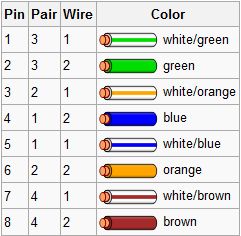
The cable is terminated in either the T568A scheme or the T568B scheme. It doesn’t make any difference which is used, as they are both straight through:

t586b-schemet586a-scheme

Crossover is used for hub to hub, computer to computer, wherever two-way communication is necessary. All gigabit ethernet equipment, and most new 10/100Mb equipment, supports automatic crossover, meaning that either a straight-through or crossover cable may be used for any connection. However, older equipment requires the use of a straight-through cable to connect a switch to a client device, and a crossover cable to connect a switch to a switch or a client to a client. Crossover cables can be constructed by wiring one end to the T568A scheme and the other end with the T568B scheme. This will ensure that the Transmit (TX) pins on both ends are wired through to the Receive (RX) pins on the other end.

If you are starting to build a LAN network now, it’s recommend to use already CAT-6 as it can accommodate most of the usual traffic in a network based on the fact that already NIC cards are build for the speed of 1Gbps. Some useful tips regarding the use of CAT-6 and any Ethernet cable are:

– Do run cables over distances up to 100 meters with their rated speed
– If you know how to handle some cabling tools, do make your own cable if you need lots of varying lengths
– Don’t order anything less than Cat. 5e cable
– Don’t crimp or staple cable, this can easily cause breaks in the cable which are sometimes hard to track down
– Ethernet cables are not directional in any way, you cannot install one backwards
– Lighter colored cables are usually a better choice for two reasons: They are easier to see in the dark, and it’s easier to read the cable catogory stamped on the side
– Use a patch cable when connecting a computer to a router or hub, use a cross over cable when connecting two computers directly together
– If it’s possible and you know that you need higher speed that 100Mbps do not mix different type of cables on the same network segment
– Even if all the specification are saying that the CAT-6 is protected against external factors, do not mount this cables close by cable power or any other cable that can influence the performance of Ethernet cable.

Below you can find a presentation of CAT-6 “how-to” thanks to Giganet:

[flashvideo filename=https://ipnet.xyz/vid/hardware/archive/2009/04/Category6UTPTermination.flv image=https://ipnet.xyz/vid/hardware/archive/2009/04//Category6UTPTermination.jpg width=486 height=412 /]

Resources used:
http://donutey.com/ethernet.php
http://en.wikipedia.org/wiki/Category_6_cable
http://en.wikipedia.org/wiki/TIA/EIA-568-B

Cisco: How to configure HSRP for load-balancing traffic

I believe many of you are already familiar with the Hot Standby Router Protocol (HSRP), but just for the one that are not I will make a short review of this protocol.
Hot Standby Router Protocol (HSRP) is a Cisco proprietary redundancy protocol for establishing a fault-tolerant default gateway, and has been described in detail in RFC 2281. The Virtual Router Redundancy Protocol (VRRP) is a standards-based alternative to HSRP defined in IETF standard RFC 3768. The two technologies are similar in concept, but not compatible.

The protocol establishes a framework between network routers in order to achieve default gateway failover if the primary gateway should become inaccessible, in close association with a rapid-converging routing protocol like EIGRP or OSPF. HSRP sends its hello messages to the multicast address 224.0.0.2 (all routers) using UDP port 1985, to other HSRP-enabled routers, defining priority between the routers. The primary router with the highest configured priority will act as a virtual router with a pre-defined gateway IP and will respond to the ARP request from machines connected to the LAN with the mac address 0000.0c07.acXX where XX is the group ID. By sharing an IP address and a MAC (Layer 2) address, two or more routers can act as a single “virtual” router. The members of the virtual router group continually exchange status messages. This way, one router can assume the routing responsibility of another, should it go out of commission for either planned or unplanned reasons. Hosts continue to forward IP packets to a consistent IP and MAC address, and the changeover of devices doing the routing is transparent. If the primary router should fail, the router with the next-highest priority would take over the gateway IP and answer ARP requests with the same mac address, thus achieving transparent default gateway fail-over.

HSRP and VRRP on some routers have the ability to trigger a failover if one or more interfaces on the router go down. This can be useful for dual branch routers each with a single serial link back to the head end. If the serial link of the primary router goes down, you would want the backup router to take over the primary functionality and thus retain connectivity to the head end.

Now, as you probably know already, HSRP is not supporting by default load-balancing, meaning that only one router can be active in the virtual router group, and only that path is used for traffic leaving the other paths unused. In this way there is a waste on bandwidth, as only one router is used to forward traffic. In normal cases, I would recommend to use another protocol named Gateway Load Balancing Protocol (GLBP), that perform the same operation as HSRP with the additional load balance feature. Anyway since we are not talking about GLBP here, and load balance with HSRP can be a subject for some Cisco exams, read below how you can achieve this feature.

First please have a look at the topology used for this example. This will make things more clear for you. As you can see R1 and R2 are connected to the same network segment, so they can share the same subnet. Let configure R1 and R2 for a basic HSRP (without load balancing):

R1
interface FastEthernet0/0
ip address 10.10.12.1 255.255.255.0
standby 1 preempt
standby 1 ip 10.10.12.3
standby 1 priority 110

R2
interface FastEthernet0/0
ip address 10.10.12.2 255.255.255.0
standby 1 preempt
standby 1 ip 10.10.12.3

R1 is the active router for group 1 (priority 110, default 100), so all the traffic will flow through R1’s path. Following I will apply the configuration to migrate this default HSRP to Multigroup HSRP (MHSRP) which is load balance aware:

R1
interface FastEthernet0/0
ip address 10.10.12.1 255.255.255.0
standby 1 preempt
standby 1 ip 10.10.12.3
standby 1 priority 110
standby 2 preempt
standby 2 ip 10.10.12.4

R2
interface FastEthernet0/0
ip address 10.10.12.2 255.255.255.0
standby 1 preempt
standby 1 ip 10.10.12.3
standby 2 preempt
standby 2 ip 10.10.12.4
standby 2 priority 110

Now we have group 1 with R1 active (10.10.12.3) and group 2 with R2 active (10.10.12.4). Of course you will have to find a way to push to the clients the 2 gateways (10.10.12.3 and 10.10.12.4) or to configure them manually on your users machines, to really achieve the load balance feature with HSRP.

To see the live presentation of how MHSRP works please click on the image below:

Cisco HSRP

Files needed for this tutorial: The topology

Cisco: How to achieve network redundancy with 2 interfaces

Sometime ago, during my preparation for Cisco CCIE certification, I encountered a task that I had to admit made me think a little bit, even I should see the solution from the first minute. The idea, at least as I see it, is that as much as you learn for some certification you start to see only the complex and painful part of the networking and this made me skip over the simplest solution. Something like, I learn to fly to the moon but I forget how to step on earth…

Before I start please have a look to this network topology. The task was having some statement that due to the monthly cost, R1 should use only one line (Frame-Relay) to communicate to the networks behind R2 (I took in this example Loopback0: 2.2.2.2 /32) and in case that the R1’s protocol interface to Frame-Relay cloud is going, the connection to R3 should become active and traffic should flow through there. The scope was to achive some redundancy from R1 to the rest of the network. As I said before the solution was much more simplest that I start initially to think of and you can see it immediately.

Regarding the routing since this is not the main point discussed here, I just add 2 static routes on R1 to 2.2.2.2; one route through R2  and another one through R3 (with higher distance metric). Of course I put the necessary static routes and tracking on R2 and R3.

One advice if you want to try this on your own with this topology. Do not manually shutdown the main interface to enable the backup one, as it will not work. For testing you have to find a way that the main interface is down, but not administratively down. This is just not to get angry that this method is not working.

cisco interface backup

Cisco: How to shape traffic on Frame-Relay connection

In some previous article, I explained how to configure a Frame-Relay Hub and Spoke network environment. Based on that example, I will show you today how you can implement traffic shaping over the Frame-Relay Hub and Spoke.You can have a look at the topology that we will use here.

A note from the beginning. Since I do not have a traffic generator, I cannot really prove that the traffic is shaped, you’ll just have to believe me or to try on your own.

Let’s assume that we have an excessive amount of packet loss between R1 and R2 from the topology and the R1 is overwhelming the Frame-Relay connection to R2. R1 has a port speed of 512Kbps and we have to assure that R1 is sending traffic at 384Kbps. In case that the connection get congested R1 should throttle down the CIR to 256Kbps. R1 should be permitted to burst in case it accumulate credit and to minimize the delay due to serialization the interval (Tc) should be 10ms.

To summarize:
-we have a CIR of 384Kbps; CIR = 384Kbps
-when congested CIR throttle down to 256Kbps;  minCIR = 256 Kbps
-time interval is 10ms; Tc = 10ms
-burst size, based on the date above is 3840 bps;  Bc=CIR*Tc=384000*0.01=3840; (note that CIR has to be in bps and time in seconds)
-also R1 is allowed to send burst in excess in case of accumulated credit, so excess burst is 1280 bps;  Be=(AR-CIR)*Tc=(512000 – 384000) * 0.01=1280 (AR is the port speed 512Kbps)

After we have gathered all this data let’s proceed to the Cisco device configuration. Please see the presentation below:

Cisco FRTS